Alert fatigue is one of those problems everyone in security talks about but nobody really fixes. You get hundreds of behavioral detections a week, most of them turn out to be noise, and the ones that actually matter end up sitting in queue because the team is busy closing false positives.
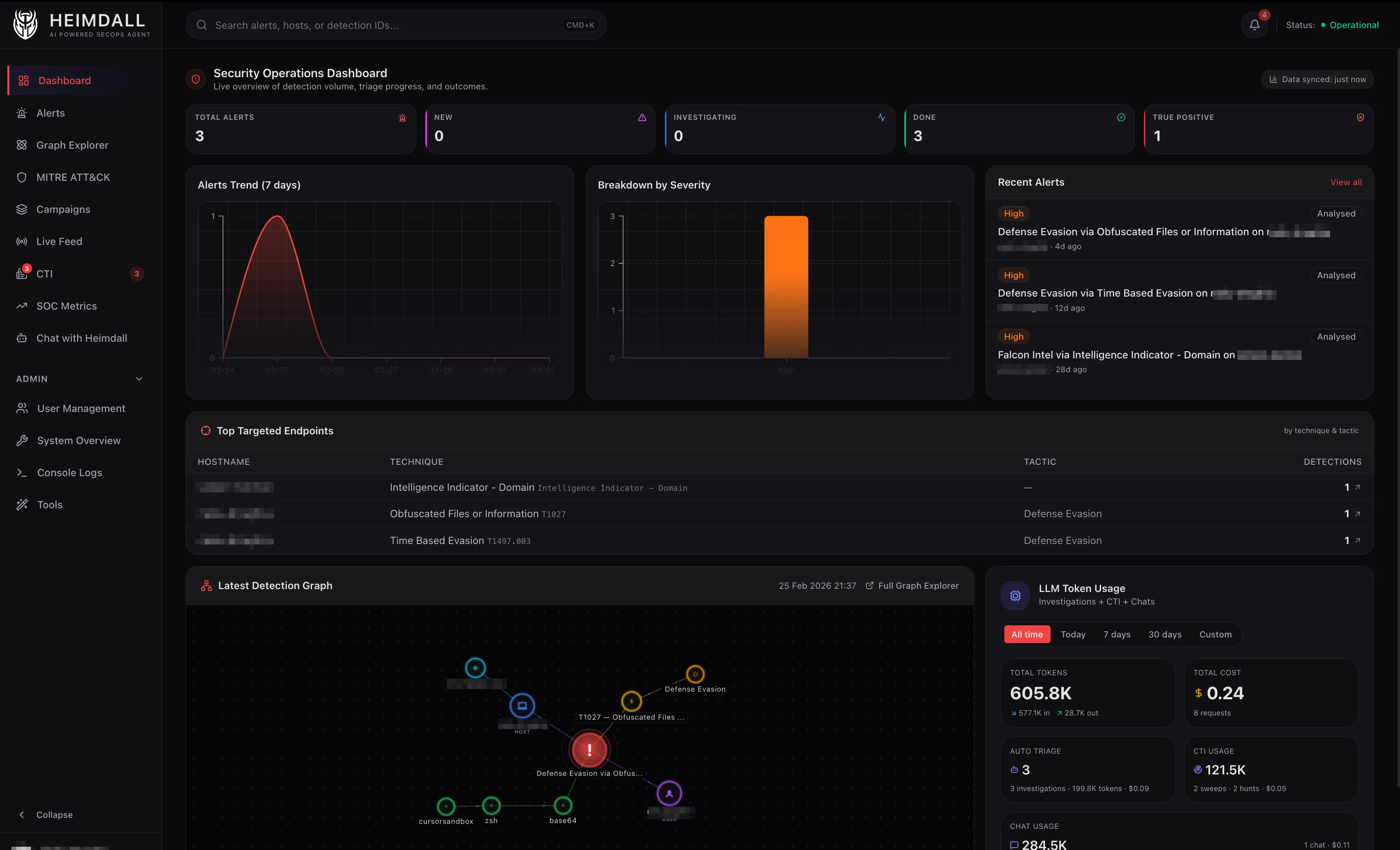
I got tired of that cycle. So I spent the last few months building an internal tool I called Heimdall, a multi-agent platform that triages EDR, AWS, and SIEM alerts autonomously. It investigates, enriches, classifies, and reports on detections end-to-end, only escalating what actually needs a human.
Heimdall is named after the Norse god who watches over the Bifrost bridge, the one who sees and hears everything. In our case, it just runs investigations and also files Jira tickets lol.
This post is the first in a series about how it works and what I learned building it.
The Problem
Modern security tooling is excellent at generating signals. CrowdStrike Falcon alone can fire hundreds of behavioral detections per week on a mid-size fleet. Add AWS GuardDuty, Falco on EKS, and Okta anomalies and you’re drowning.
Most SOC teams don’t have a staffing problem. They have a triage problem. Every minute spent on a false positive is a minute not spent investigating a real breach.
I wanted to build a system that could:
- Ingest alerts in real time from CrowdStrike, Elastic, and AWS
- Enrich them deterministically with process trees, network telemetry, and file hashes (no LLM needed)
- Triage autonomously using an LLM that reasons about MITRE ATT&CK context, known-benign patterns, and VirusTotal scores
- Escalate intelligently by notifying Slack on true positives, staying silent on false positives, and flagging uncertain ones for human review
- Cost less than a cup of coffee per hundred alerts
Current Tech Stack
- Backend: Python with FastAPI
- CrowdStrike Integration: Official CrowdStrike MCP server for detections, hosts, incidents, NG-SIEM queries, and threat intel; FalconPy SDK (direct) for RTR sessions due to their stateful nature
- LLM Providers: Anthropic Claude, OpenAI, Google Gemini (configurable per agent)
- Dashboard: TypeScript/React on Next.js
- Graph Database: Memgraph for entity correlation and blast radius analysis
- Local Storage: SQLite via Drizzle ORM for alert state and audit logs
Architecture: Agents All the Way Down
Heimdall isn’t a single monolithic prompt. It’s an orchestrator backed by six specialized sub-agents, each with its own system prompt, tool access, and reasoning constraints.
                ┌─────────────┐
 User/Webhook → │ Orchestrator│
                └──────┬──────┘
       ┌───────┬───────┼───────┬───────┬───────┐
       ▼       ▼       ▼       ▼       ▼       ▼
    Triage   Hunt  Investigate Enrich  RTR    CTI
- Triage – Tier-1 analyst: classify alerts as TP, FP, or Needs Review – max 6 tool calls
- Hunt – Proactive threat hunting across NGSIEM, EKS, CloudTrail – max 8 tool calls
- Investigate – Deep cross-source investigation for complex incidents – max 8 tool calls
- Enrichment – Threat intel: IOC lookups, actor profiles, VT reputation – max 8 tool calls
- RTR – Real-Time Response on endpoints (with approval gates) – approval required
- CTI – Cyber Threat Intelligence: score RSS feeds against your stack – max 8 tool calls
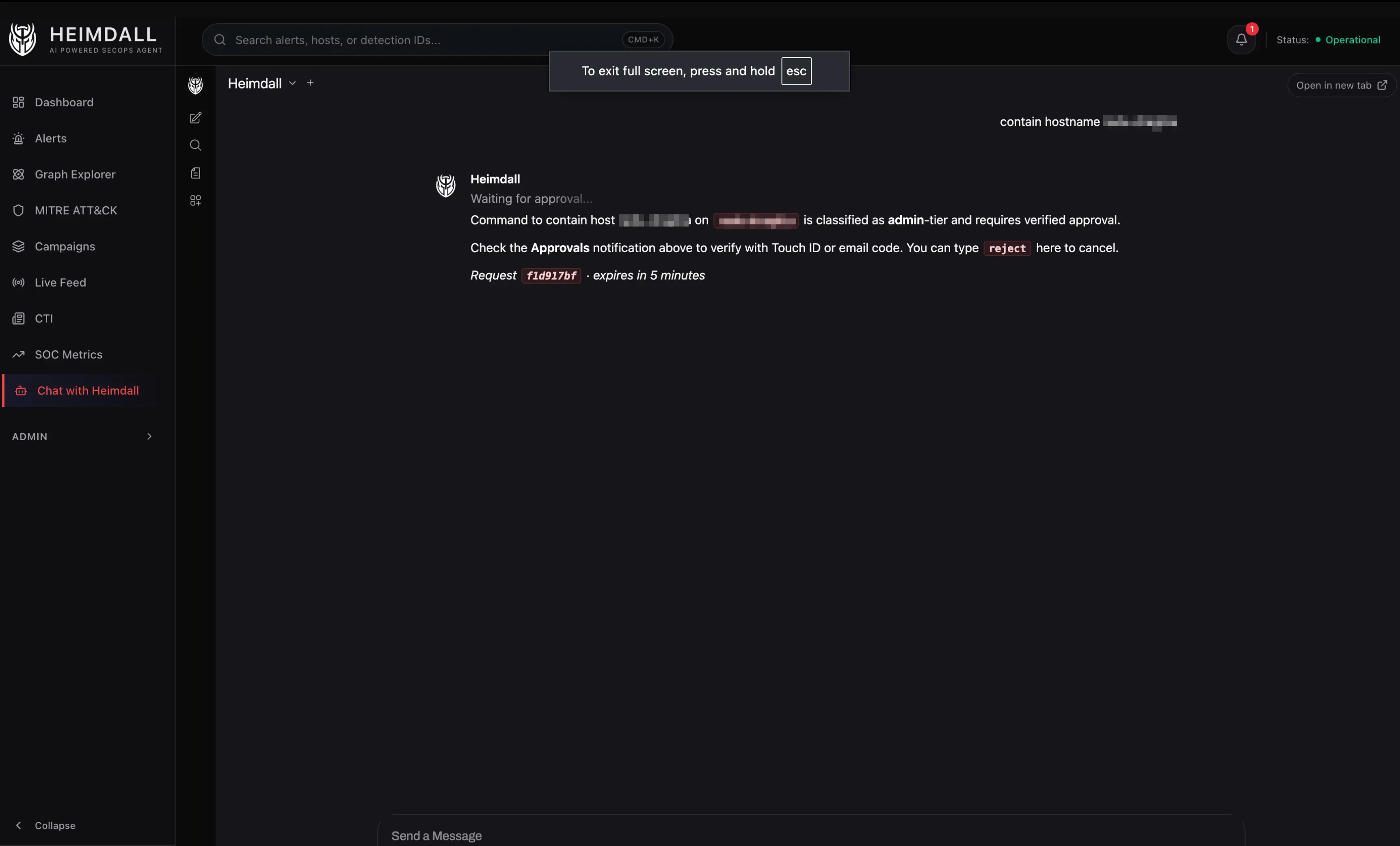
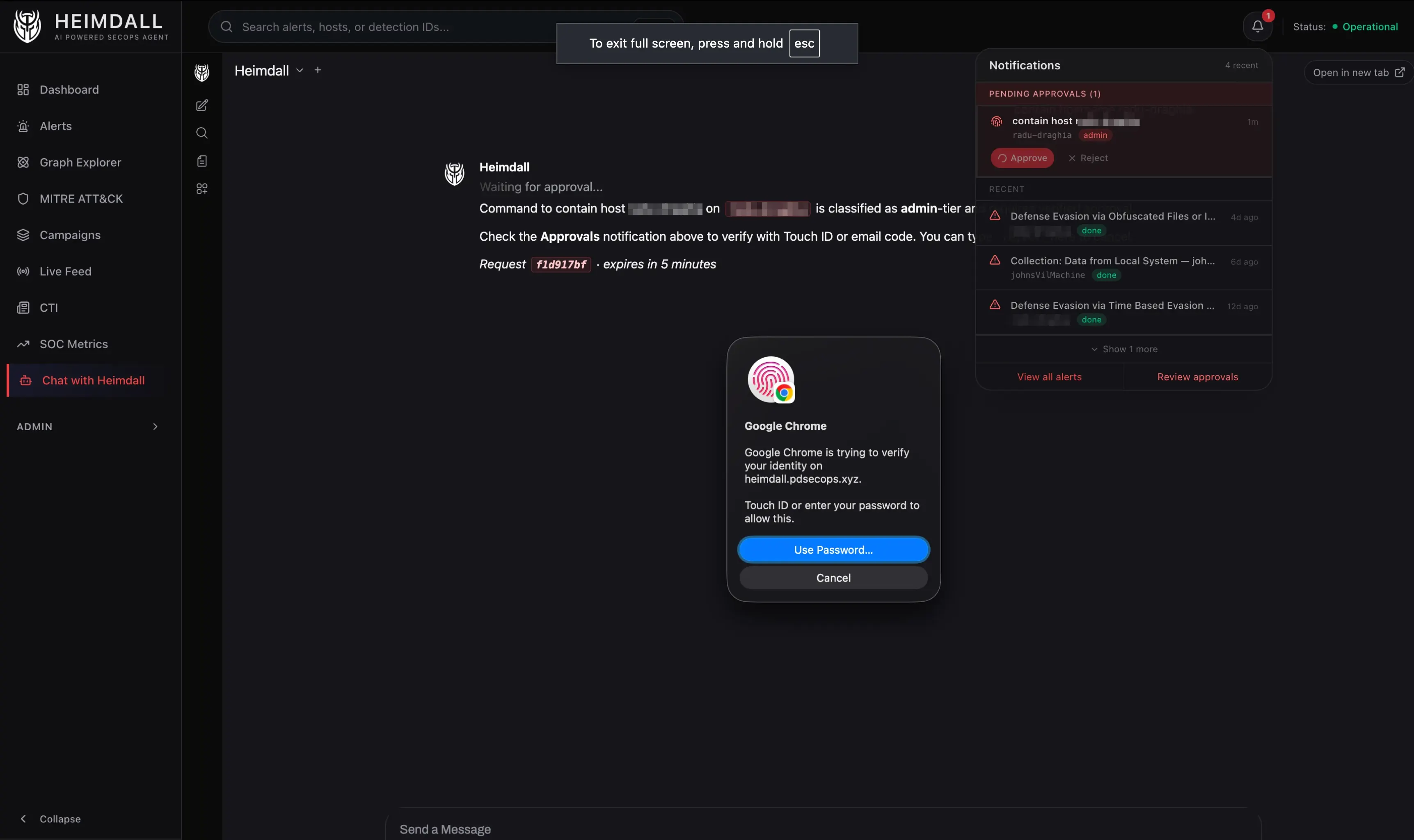
An LLM-based classifier (Gemini 2.5 Flash, ~300 tokens, temperature 0) inspects each incoming request, determines intent, and routes to the right agent. The classifier also flags destructive operations. Anything that kills a process, contains a host, or runs a script gets routed through an approval workflow that requires WebAuthn (Touch ID) or email OTP.
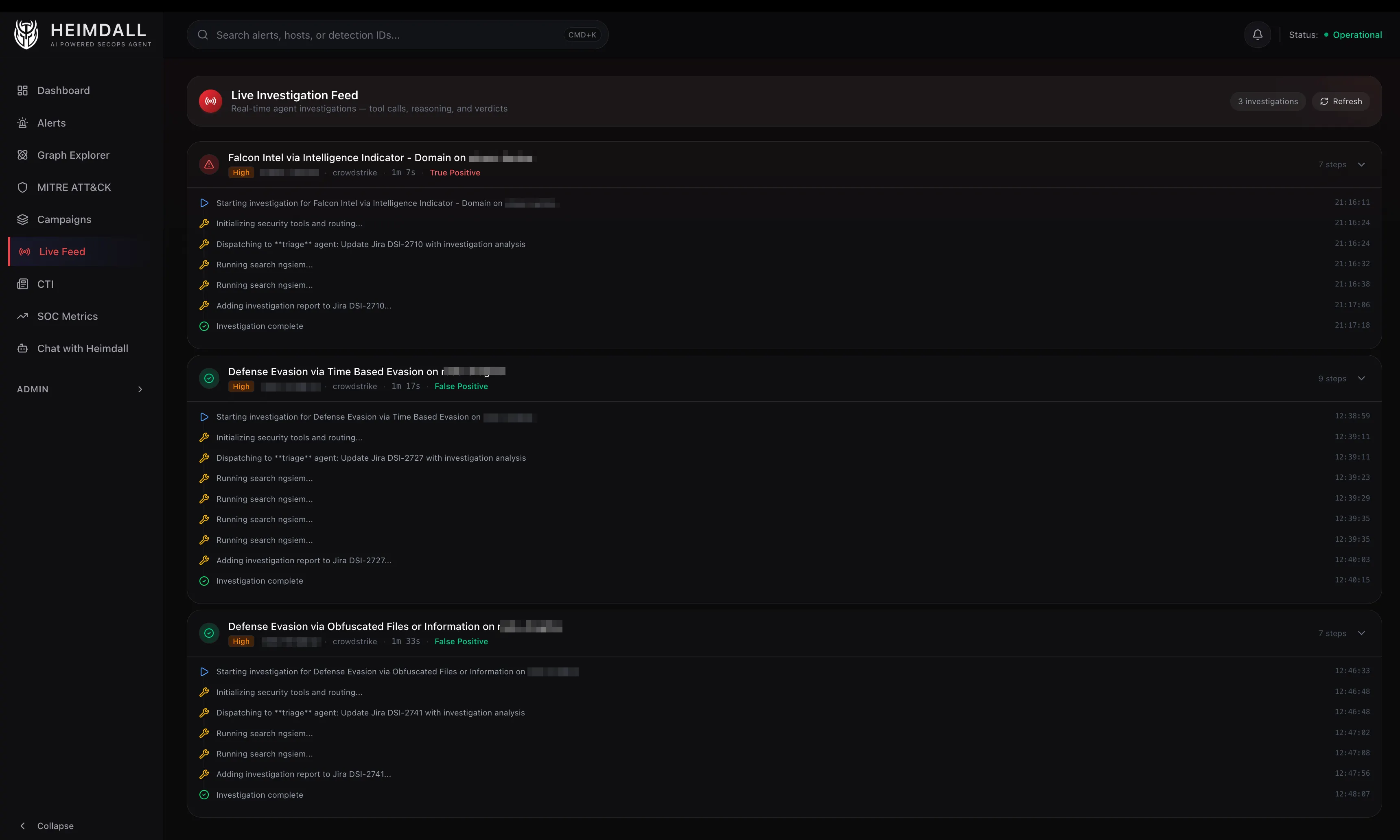
The Two-Phase Pipeline: Enrich First, Think Second
One architectural decision that cut investigation costs by roughly 25%: enrich before you reason.
Phase 1: Deterministic Enrichment ($0)
When an EDR alert arrives, the first thing Heimdall does, before any LLM touches it, is call the Falcon Alerts v2 API directly with FalconPy. No MCP server, no tokens spent. This returns:
- Device context: hostname, OS, IP, MAC, domain, agent version
- Process tree: the detection process, its parent, and grandparent, with command lines, SHA256 hashes, and user context
- Network telemetry: remote connections, ports, protocols, direction
- DNS requests: domains resolved around the time of detection
- File activity: files written, accessed, or modified
- MITRE mapping: tactics and techniques with confidence scores
There’s a subtle but important step here: sibling merging. CrowdStrike often fires multiple behavioral alerts for the same incident on the same host within minutes. Heimdall finds sibling alerts in a +/-30-minute window and merges their telemetry into a single enriched view, mirroring what you’d see in the CrowdStrike Process Tree UI but aggregated programmatically.
Phase 2: LLM Triage (~$0.017/alert)
With the enriched context pre-loaded, the triage agent doesn’t need to call falcon_get_detection_details via MCP at all. It already has the full picture. Instead it goes straight to reasoning:
- Check for known-benign patterns like MDM scripts, signed vendor binaries, etc.
- Query NGSIEM for child processes. The detection shows the process that triggered the alert, but the payload is often a child process. A CQL query for
ProcessRollup2events with the detection’s filename as parent, +/-5 minutes around detection time, reveals what actually ran. - Check VirusTotal conditionally. Skip VT for clearly benign cases. Use it for unknown executables or ambiguous severity. Threshold: 0-2 detections means likely FP, 3-10 means needs review, 10+ is a strong TP indicator.
- Classify with confidence. High means clear evidence. Medium means strong indicators with uncertainty. Low means recommend human review.
Tool Integration via MCP
Heimdall connects to its security tools through Model Context Protocol servers, lightweight sidecars that expose tool APIs as structured function calls for LLMs.
- Falcon – Detections, hosts, incidents, NG-SIEM queries, threat intel, RTR sessions
- CloudWatch – Log Insights queries across the AWS accounts
- VirusTotal – File, IP, domain, and URL reputation
- Elastic – ES|QL queries against Okta, CloudTrail, GuardDuty, Falco, Google Workspace
- Atlassian – Jira ticket updates, Confluence lookups
Each sub-agent has a tool filter, a set of glob patterns that controls which MCP tools it can access. The triage agent can search detections and query NGSIEM, but it can’t initiate RTR sessions. The RTR agent can execute commands on endpoints, but it can’t query Elastic. This isn’t just about prompt engineering – it’s about reducing the blast radius when an LLM makes a mistake.
The tool budget matters just as much. Triage gets 6 calls max. Investigate gets 8. This forces the agents to be efficient instead of falling into the “let me check everything just in case” pattern that burns tokens and time.
Graph-Powered Correlation
This unlocks two features I’m particularly happy with.
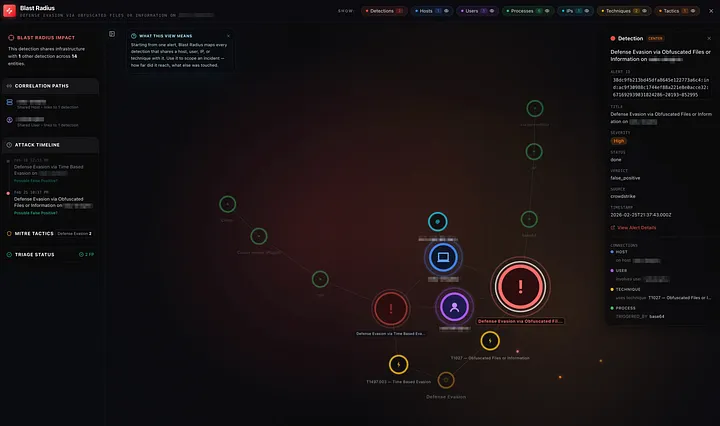
Blast Radius – Select any detection and instantly see everything it touches: which other detections share its host, which IPs it connected to, which users were involved, which MITRE techniques overlap. This is the “how far did it reach?” question that usually takes an analyst 30 minutes of tab-switching to answer.
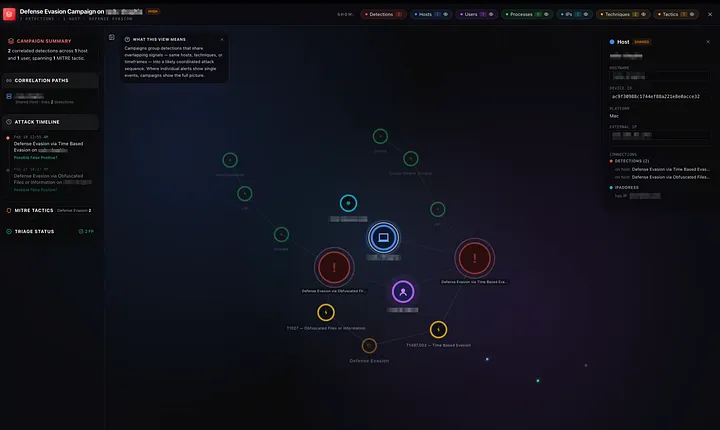
Campaign Detection – Heimdall runs a Union-Find algorithm across the graph to identify campaigns, groups of detections that share entities. Two alerts on different hosts that both resolve the same suspicious domain? Same campaign. An alert on a user’s laptop and an alert on a server they SSH’d into? Connected.
What the Triage Agent Actually Thinks
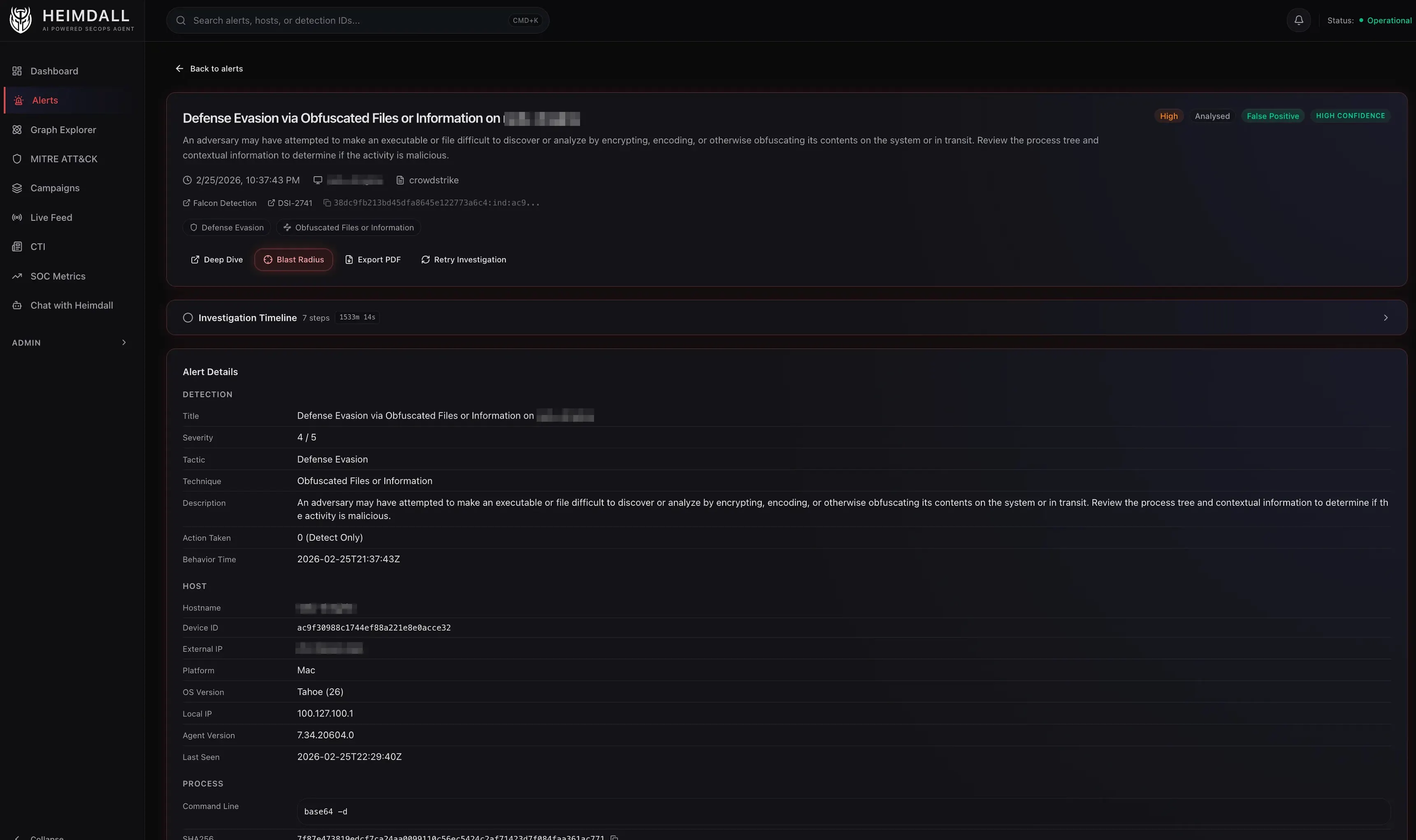
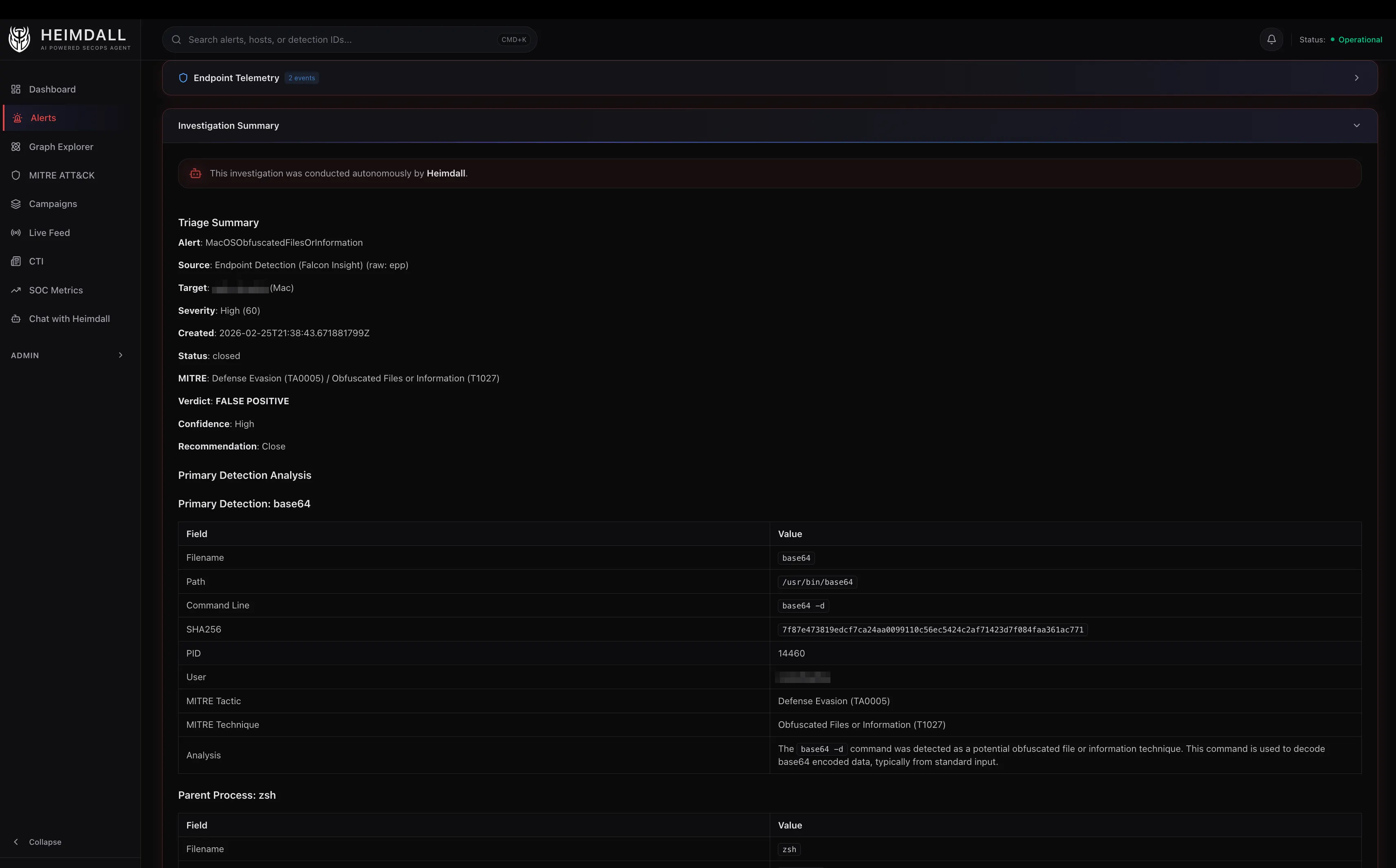
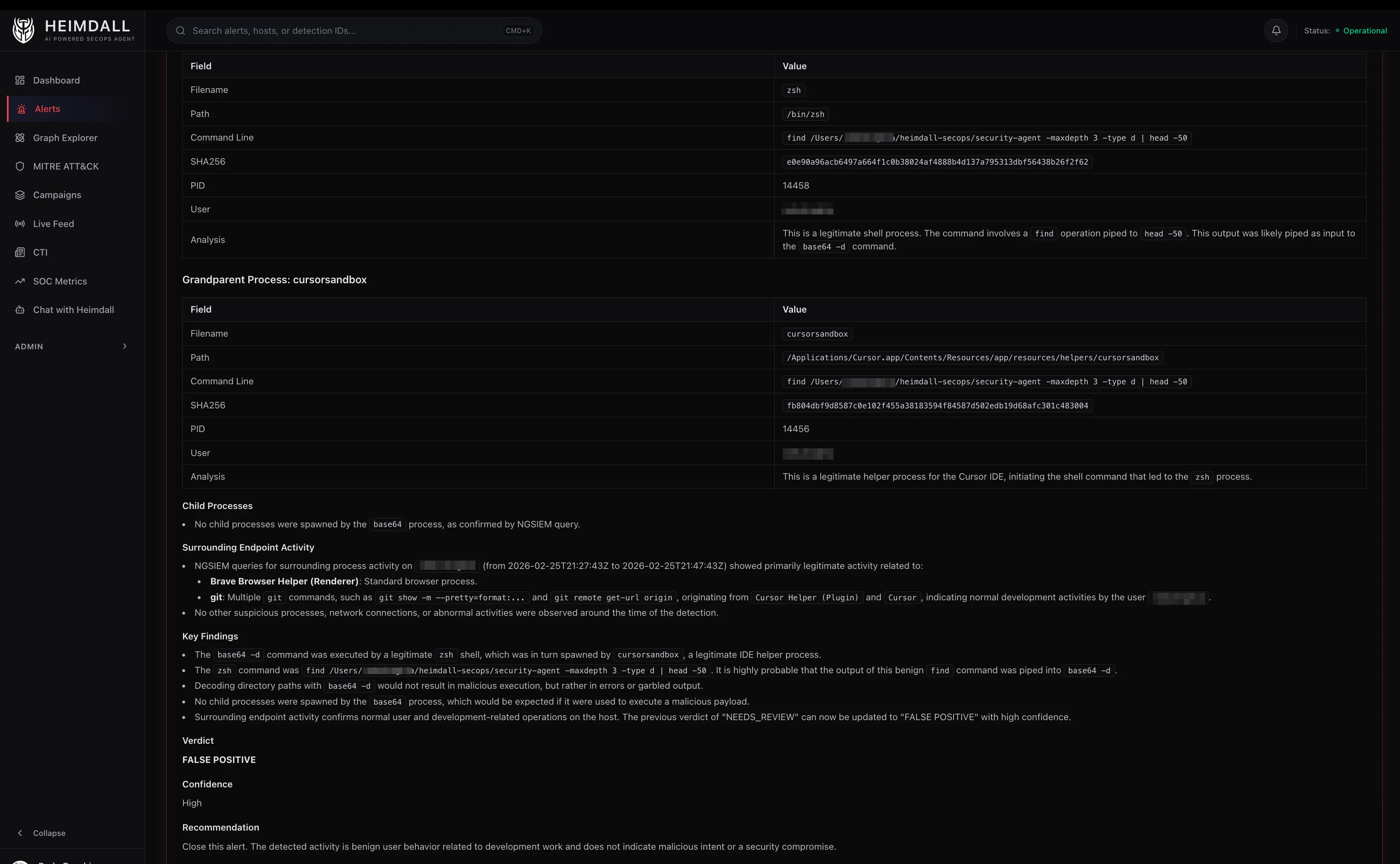
Here’s a lightly edited example of how the triage agent processes a real alert. The detection: “Defense Evasion via Obfuscated Files or Information” on a macOS endpoint.
An example of the agent’s reasoning chain:
- Pre-loaded context shows the triggering process is
base64with parentzsh, grandparentCursor Helper (Plugin). The command line isbase64 --decode. - NGSIEM child process query reveals the decoded output was piped to
sh, which spawned nothing suspicious. The child processes arenodeandgit, consistent with a VS Code extension running a build script. - VirusTotal skipped because
base64is a signed macOS system binary. - Pattern match: IDE extensions frequently shell out with encoded arguments to avoid escaping issues. The parent chain (Cursor -> zsh -> base64) is a known-benign pattern.
- Verdict: False Positive, High Confidence. CrowdStrike correctly flagged
base64 --decode | shas defense evasion (T1027), but in this context it’s normal IDE behavior.
Total tool calls: 2 (search alert + NGSIEM query). Total cost: ~$0.012. Time: 8 seconds.
A human analyst would reach the same conclusion, but it would take 10-15 minutes of clicking through the CrowdStrike console.
MITRE ATT&CK as a First-Class Citizen
Every detection is mapped to its MITRE tactics and techniques, and the dashboard maintains a live coverage heatmap. This isn’t just decorative. It answers the question: where are we seeing the most activity, and where are our blind spots?
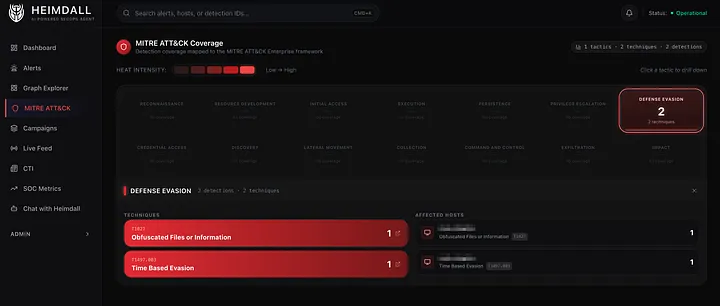
The triage agent uses MITRE context in its reasoning too. A T1059.004 (Unix Shell) alert with a parent of launchd is very different from one with a parent of curl | sh. Same technique, completely different risk profile.
Safety: The Approval Gate
The most important design decision in Heimdall isn’t about performance. It’s about restraint. The system can initiate Real-Time Response sessions on endpoints: list processes, check file hashes, inspect network connections. But the moment it needs to do something, like kill a process, delete a file, or contain a host, it stops and asks.
RTR commands are tiered:
| Tier | Commands | Action |
|---|---|---|
| Read-only | ps, netstat, ls, filehash | Execute immediately |
| Active | kill, rm, runscript | Requires approval |
| Admin | reg delete, runscript (elevated) | Requires approval |
| Blocked | rm -rf /, format, dd | Always rejected |
Approval isn’t a chat message. It’s a dedicated dashboard page with WebAuthn, either Touch ID or a hardware security key. Certain destructive patterns (fork bombs, raw device writes, recursive deletes from root) are blocked entirely, regardless of approval.
What I’d Do Differently
Structured output from the start. Early versions had the LLM produce free-text verdicts that I’d parse with regex. Switching to structured output mode where the model returns JSON with defined fields for verdict, confidence, and reasoning eliminated an entire class of parsing bugs.
More aggressive caching. Tool results are cached with a 1-hour TTL, but investigation results are cached permanently. I should have done permanent caching for more tool calls. NGSIEM results for the same host and time window rarely change.
There’s a lot I didn’t cover here, like how the graph database works and how it powers the blast radius and campaign correlation views. That’ll be the next post.