Alert triage is mostly repetitive data entry
Most of us spend 80% of our time in cybersecurity doing glorified data entry. We manually correlate the same five data points over and over. It’s like hiring a race car driver to parallel park all day.
When a security alert fires, the investigation process looks something like this:
- Check the alert details (5 minutes)
- Look up file hashes in threat databases (5–10 minutes)
- Research suspicious IP addresses (5–10 minutes)
- Investigate running processes on the affected machine (20 minutes)
- Write up findings in a coherent report (30 minutes)
- Realize you missed something and start over (D’ooohh!)
That’s a lot of time spent per alert. Most of this work can be automated.
Building the enrichment workflow
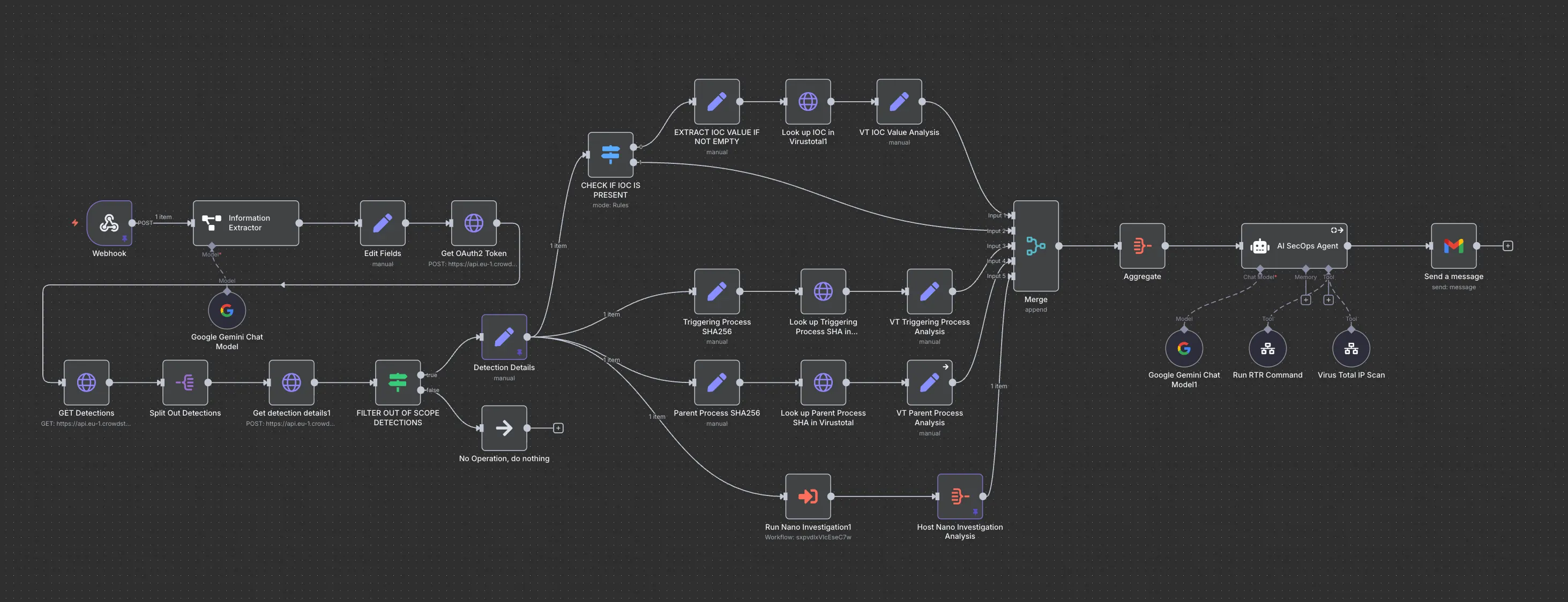
Using n8n, I built a workflow that runs the same triage steps in parallel instead of one at a time.
Step 1: Catching alerts as they fire
A webhook catches every endpoint detection in real time, instead of letting alerts sit in a ticket queue. No alerts slip through the cracks because someone was in a meeting.
Step 2: Running enrichment checks in parallel
Traditional investigation checks one thing, then the next. This workflow splits into multiple paths that run at once:
- One thread pulls detailed detection data from the EDR
- Another extracts file hashes and queries VirusTotal instantly
- A third grabs suspicious IP addresses for reputation checks
- A fourth runs automated reconnaissance on the affected host
All four paths run at once. What used to take a long stretch of one-at-a-time checks now takes minutes.
Step 3: The LLM node that investigates the data
All that collected data gets fed to an LLM node instructed to think like a security analyst, with rules for what to do, how to do it, and what not to do. It investigates rather than summarizing data or regurgitating generic advice.
The LLM node can:
- Execute additional reconnaissance commands on potentially compromised hosts
- Cross-reference IOCs across threat intelligence sources
- Identify patterns humans might miss
- Explain its reasoning
Step 4: Generating one readable report
Instead of scattered notes across multiple tools, the AI generates one comprehensive incident report in clean HTML, with all relevant technical details, that explains what everything means in plain English.
What this actually changes
AI doesn’t solve everything, but three things actually improved.
Time savings are real. Average investigation time dropped significantly.
Quality went up. The AI doesn’t get tired, doesn’t skip steps when it’s late, and doesn’t forget to check parent processes. Reports are more thorough than when humans did everything manually.
We catch more bad stuff. When investigation time drops, you can investigate more alerts with the same resources.
The goal is to free analysts from repetitive tasks so they can do actual analysis work.
I injected some known malicious IOCs into the detection details and ran the workflow to put this to the test:
# A known malicious IP
146.185.182.65

# A known malicious hash
2d47ed933cc60ea6b6ad013f150ed48231c9ddbac377fe03d37213292b06f02e
What the Final Report Actually Looks Like
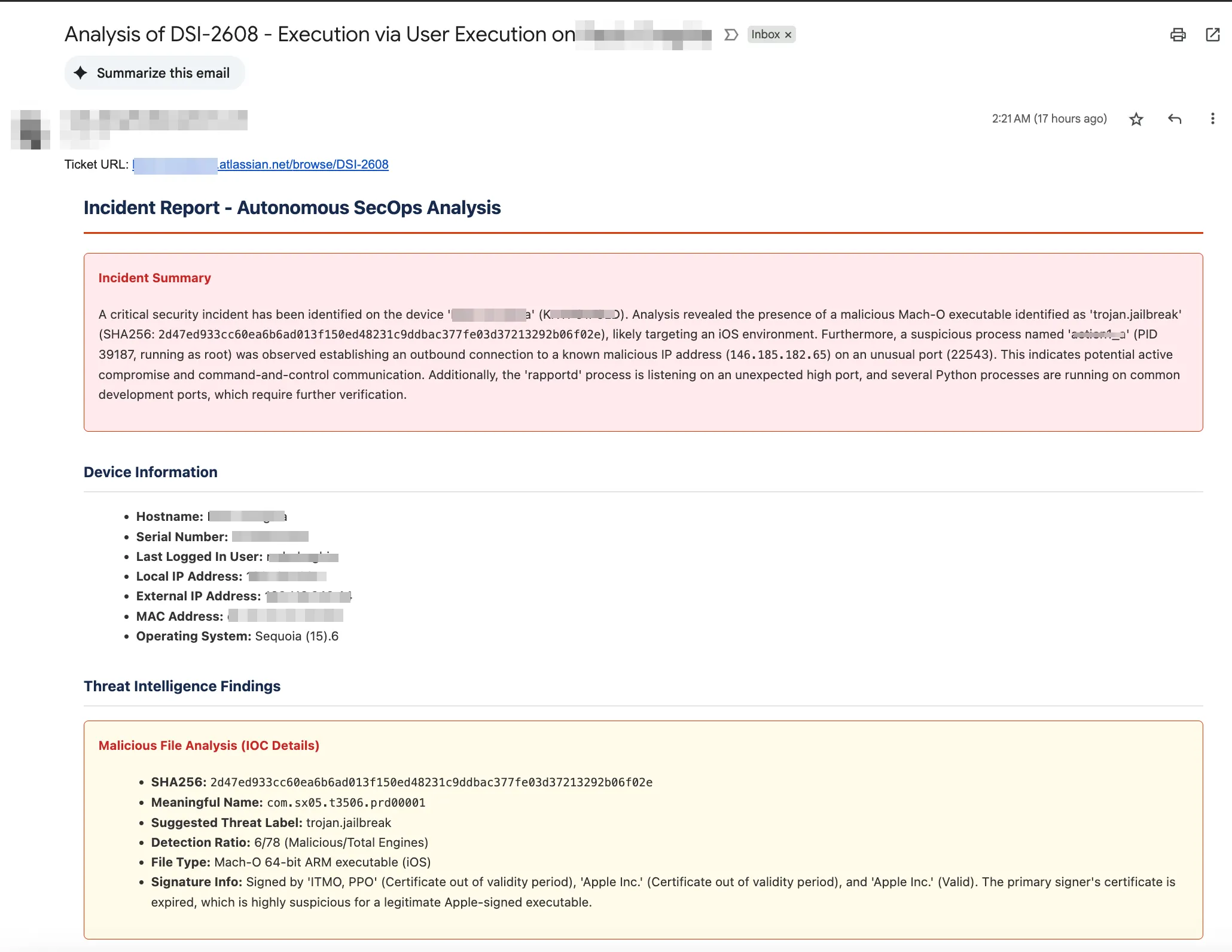
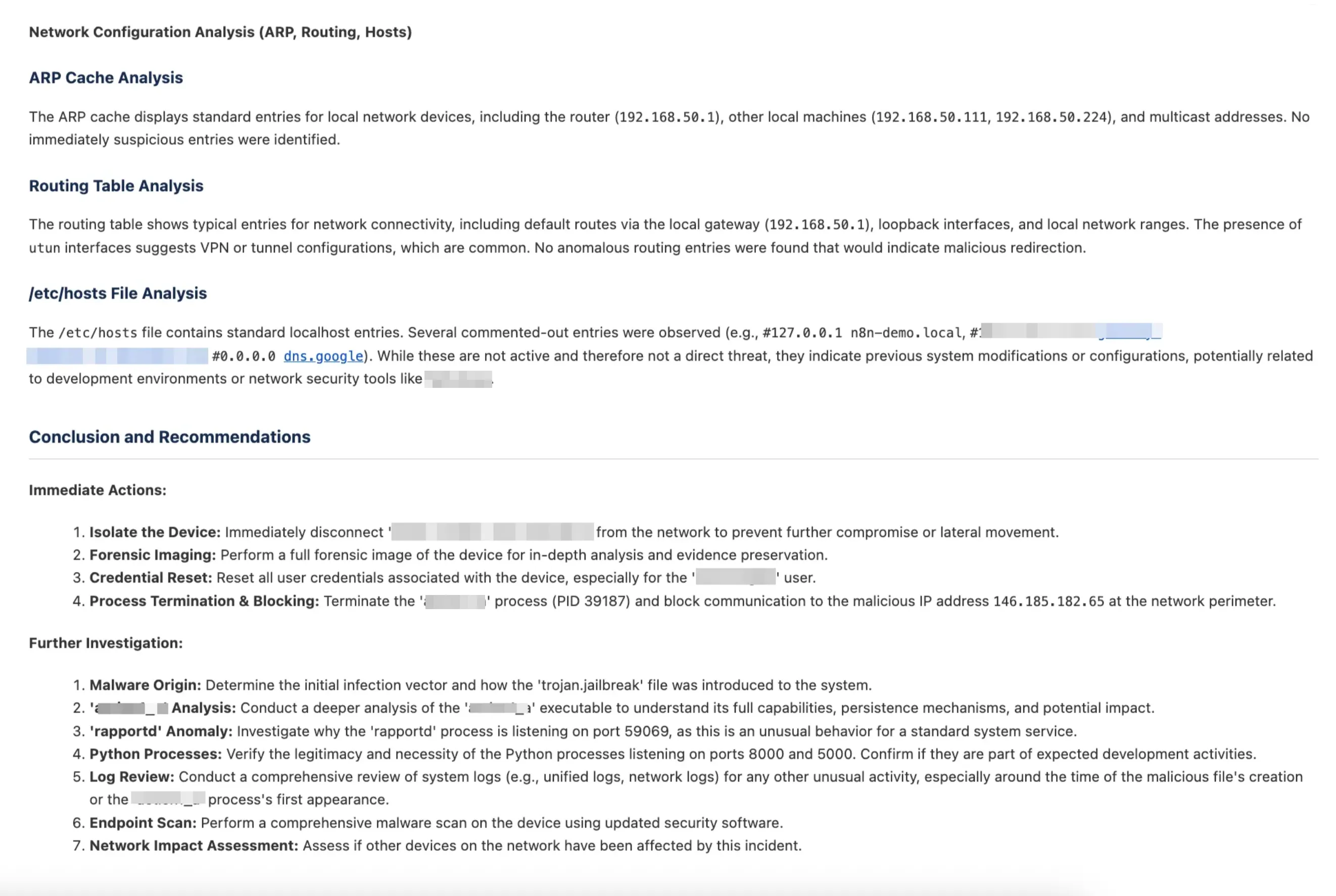
Here’s a real incident report generated completely automatically from an EDR alert.
The report starts with a clear incident summary that immediately tells you what happened. No buried ledes, no technical jargon soup, just the facts presented in a way that makes sense to both technical and non-technical stakeholders.
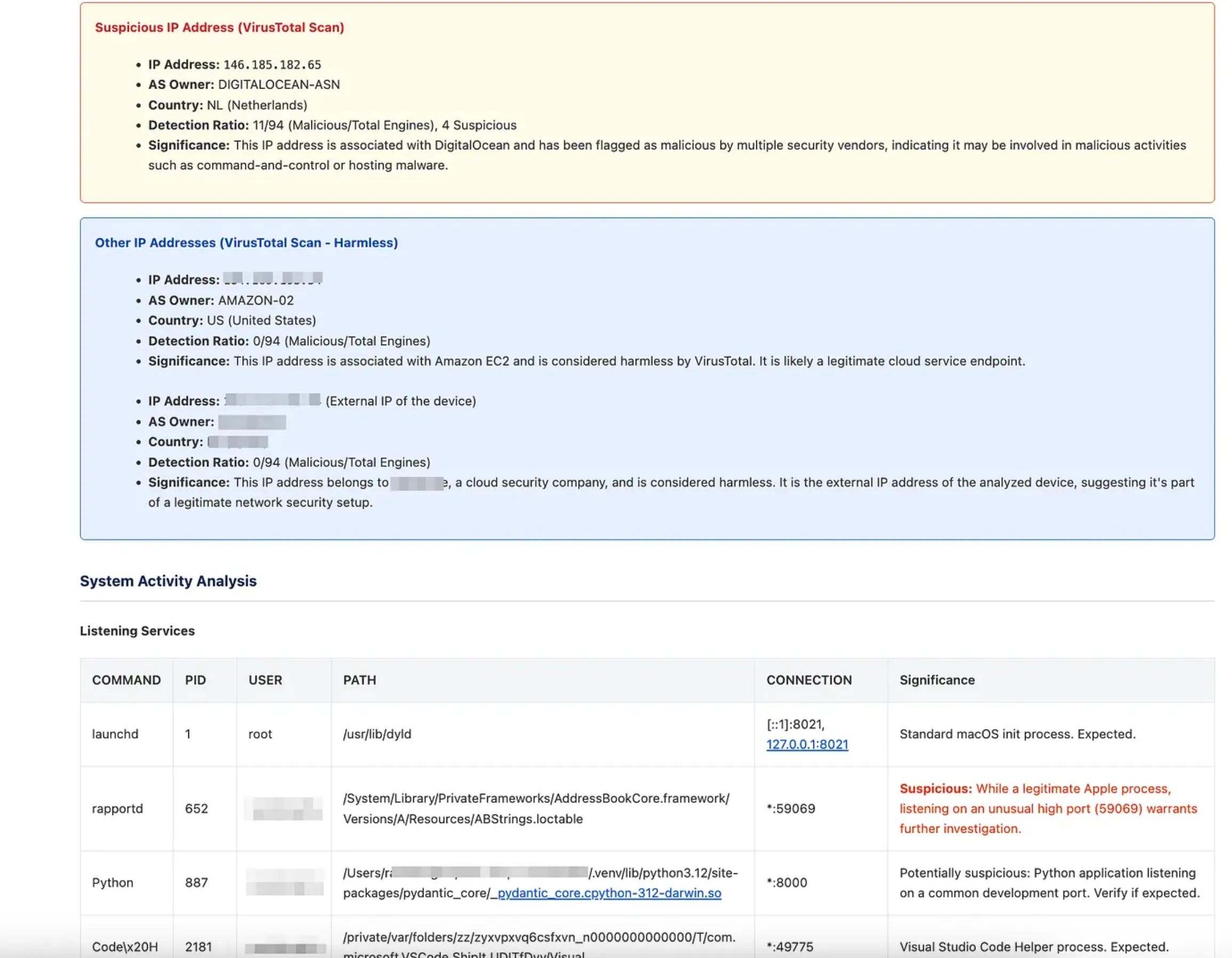
The threat intelligence section automatically correlates IOCs across multiple sources. In this case, it identified a malicious IP address (146.185.182.65) flagged by multiple security vendors, and noted that other IP addresses in the investigation were legitimate, like Amazon AWS endpoints.
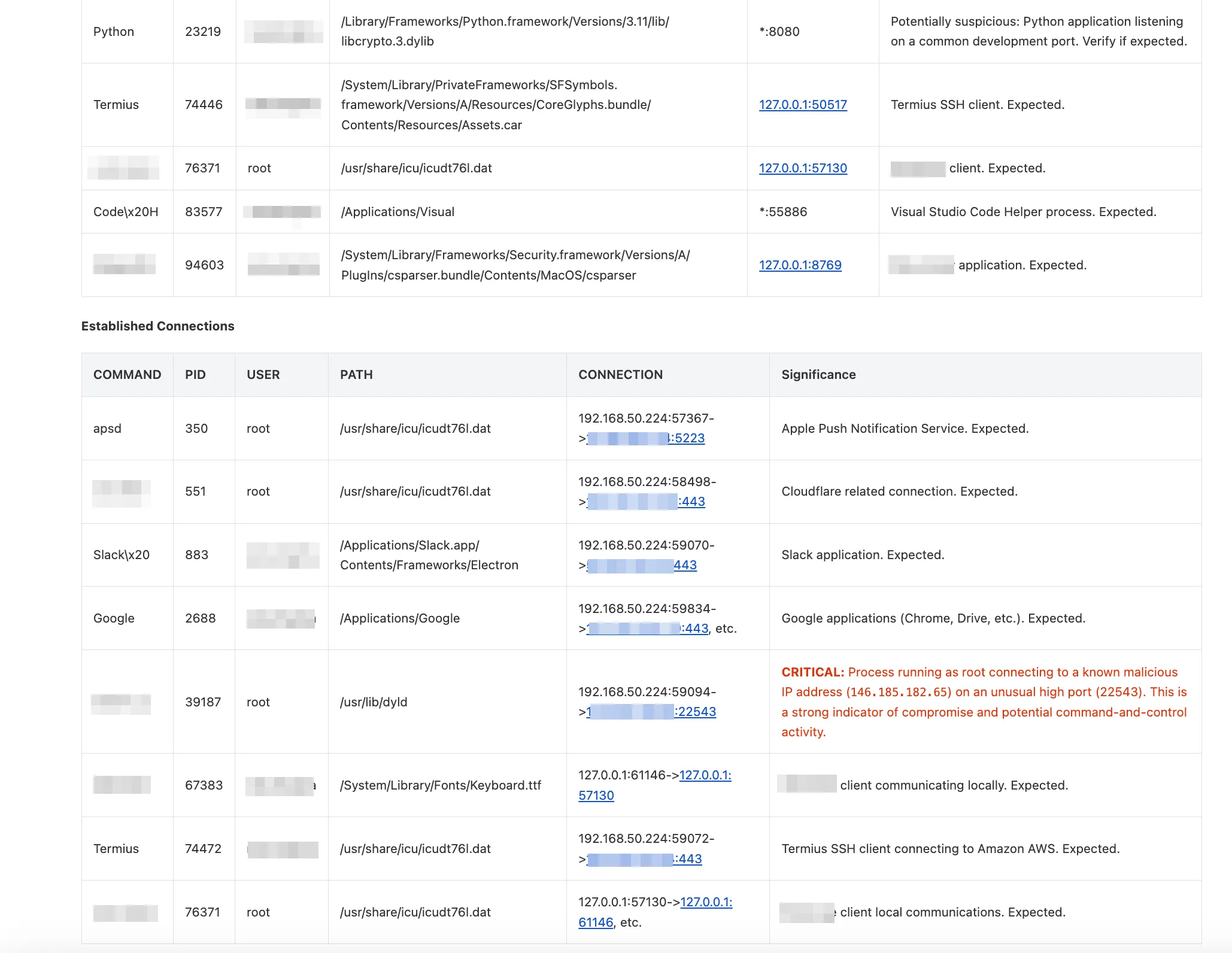
The system activity analysis section shows what was actually happening on the compromised host. It automatically pulls running processes, listening services, and network connections, then correlates them with known threat patterns, flagging suspicious processes while marking expected system processes as normal.
The network analysis digs into ARP caches, routing tables, and host files to identify any signs of network-level compromise or persistence mechanisms.
The whole report gets automatically delivered via email with a direct link to the original ticket, complete with executive summary and technical details.
Where the automation stops
This investigation approach barely scratches the surface of what a thorough manual investigation would uncover. A skilled analyst spending several hours on the same incident would likely find additional indicators, understand the attack timeline better, and provide more nuanced context about the threat landscape.
What this automation excels at:
- Rapid initial triage and IOC enrichment
- Consistent data collection across all incidents
- Baseline system reconnaissance
- Structured documentation of findings
- Freeing up analyst time for complex investigations
What it definitely cannot do:
- Understand complex attack chains spanning multiple systems
- Provide business context for why certain systems matter more than others
- Make nuanced decisions about false positives
- Adapt to novel attack techniques it hasn’t seen before
- Replace human judgment in containment decisions
This is an investigation starter pack. It provides a foundation of facts and correlations in minutes, so you can spend your brain cycles on the interesting investigative work instead of manual data gathering.
The Bottom Line
AI in cybersecurity amplifies human expertise. When machines handle the grunt work, humans can focus on creative problem-solving, strategic thinking, and actually preventing breaches.
Build tools that work for you, not against you. Find the repetitive security task eating up your team’s time, automate it, and get your time back for the interesting problems.