Every AI coding agent worth using can run shell commands. It edits files, runs your test suite, installs packages, greps through your codebase. That’s the whole point, and it’s also the whole problem. A coding agent with shell access is, functionally, a remote code execution primitive that you invited in yourself and pointed at your home directory.
Most people’s mitigation is “I read the diff before I approve it.” That works about as well as you’d expect against a prompt-injected curl | sh buried in a dependency’s postinstall script, or an agent that decides rm -rf node_modules is a reasonable way to “start fresh” and gets the working directory wrong.
Container-based sandboxes are the common answer, and they help, but “sandboxed” is a word with a wide range of actual guarantees behind it. Docker-based agent sandboxes in particular have a track record of container-escape and shared-daemon issues once you look closely, the same category of weakness that shows up in Docker security research generally. That’s the backdrop I had in mind going in.
Claude Code ships its own sandbox mode for exactly this reason. It runs bash commands under OS-level confinement (sandbox-exec on macOS, Landlock/seccomp on Linux) with filesystem and network restrictions, so a lot of accidental or malicious commands get blocked before they do anything. It’s a real improvement over no sandboxing at all, and worth using on its own. But it still shares your kernel and your process tree, with the boundary enforced by an OS-level policy rather than a hardware one. “Shares a kernel with everything else on the machine” wasn’t a boundary I wanted to trust by default. I wanted the isolation boundary to be the CPU’s virtualization extensions instead of a policy, however well-implemented. That’s airlock.
What it actually is
airlock boots a real microVM (not a container, not a chroot) for every agent session, using Microsandbox on Apple’s Hypervisor.framework. Your project directory gets mounted read-only into the guest as the base of an AgentFS copy-on-write workspace. The agent (Claude Code or OpenCode, your choice) runs inside that VM and can do whatever it wants to /workspace. Every write lands in the guest’s own store, never on your actual disk.
┌─────────────────────────────────────┐
│               microVM               │
│ ┌─────────────────────────────────┐ │
│ │        /hostproject (ro)        │ │  ◀── your project (read-only virtiofs)
│ └────────────────┬────────────────┘ │
│                  │ copy-on-write    │
│ ┌────────────────▼────────────────┐ │
│ │       /workspace (AgentFS)      │ │  ◀── agent writes here
│ └─────────────────────────────────┘ │
└─────────────────────────────────────┘
Nothing the agent does touches your real files until you explicitly say so with airlock promote. Exiting the sandbox doesn’t destroy anything either. The VM keeps running in the background so you can come back to it, or bring the agent’s work out later.
Why a VM instead of a container, or an OS-level sandbox
Containers share your host kernel. A container escape is a kernel exploit away from being a host compromise, and “container escape” is a recurring category of CVE, not a hypothetical one. The same logic applies, one level down, to OS-level sandboxing like Claude Code’s. seccomp/sandbox-exec policies restrict what a process can do, but the kernel enforcing those restrictions is still the same kernel the sandboxed process shares with everything else on your machine. A microVM gets its own kernel and its own virtualized hardware. The isolation boundary becomes the CPU’s virtualization extensions, not a set of namespaces, cgroups, or syscall filters that a sufficiently motivated (or sufficiently lucky) process can punch through.
This isn’t a purely theoretical distinction for me. Before committing to this project I checked whether the specific guest kernel this thing boots actually carries known, exploitable vulnerabilities. Two CVEs came up in that research. One turned out to be architecture-agnostic but already patched upstream in the guest’s kernel version. The other was AMD-specific and doesn’t apply to an ARM64/Apple Silicon guest at all. I tested it empirically, against the real running kernel, instead of assuming “it’s a VM so it’s fine.”
Keeping the agent’s own credential out of the sandbox
Sandboxing the filesystem is the easy 80%. The harder problem is that your coding agent needs to authenticate to something (Anthropic’s API, GitHub Copilot, OpenRouter, etc.), and that credential is exactly the kind of thing you don’t want sitting in plaintext inside a VM that also happens to be running an LLM with shell access and internet connectivity.
airlock handles this with what I call protected-credential mode. The real secret never enters the guest. Instead:
- The credential is stored in 1Password, referenced from a local
.envfile as anop://vault/item/fieldpointer, resolved on the host at launch time via the 1Password CLI. - The guest gets a placeholder string in its config, something like
$MSB_OPENCODE_OPENROUTER, not the actual key. - Microsandbox’s
--secret VAR@HOST --tls-interceptflags install a CA into the guest’s trust store and intercept outbound TLS. When the agent’s placeholder string reaches a request to the allowed host, the proxy swaps in the real secret at the network boundary.
Step 1 happens right on the host, in front of you, every time. airlock shells out to the 1Password CLI, which surfaces its own OS-level prompt before it will hand over anything.
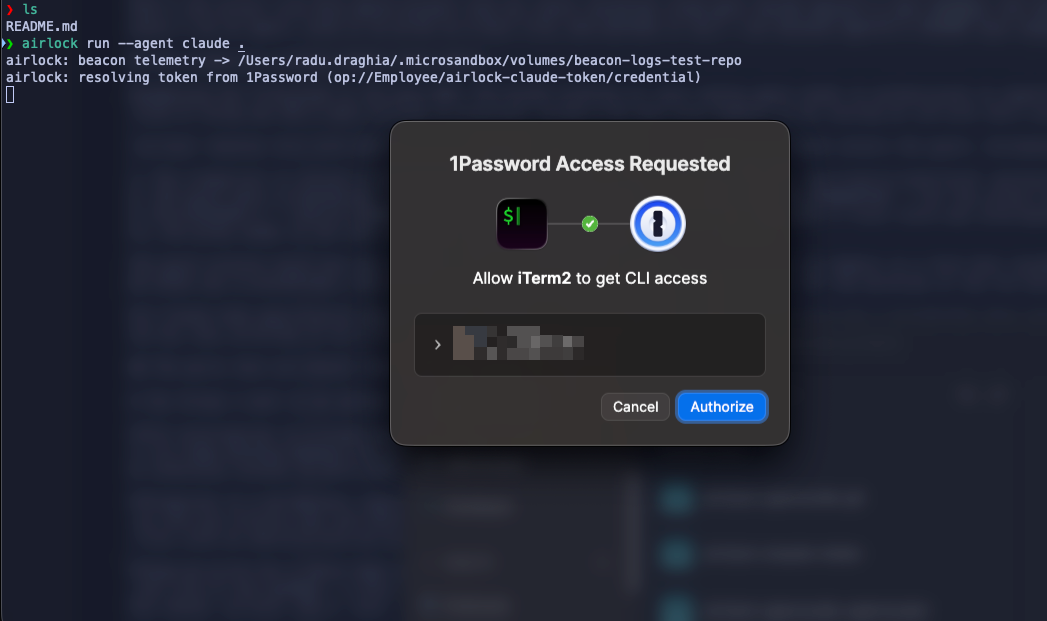
The guest process never has the credential in its environment, its config files, or its memory in a form that resolves to anything usable. ps eww inside the sandbox shows you a placeholder. A file read shows you a placeholder. The only place the real value ever exists is host-side, in the intercepting proxy’s memory for the life of the sandbox, and it only gets substituted into a request’s decrypted headers after the TLS handshake completes, and only when that request is headed to the specific host that credential is bound to.
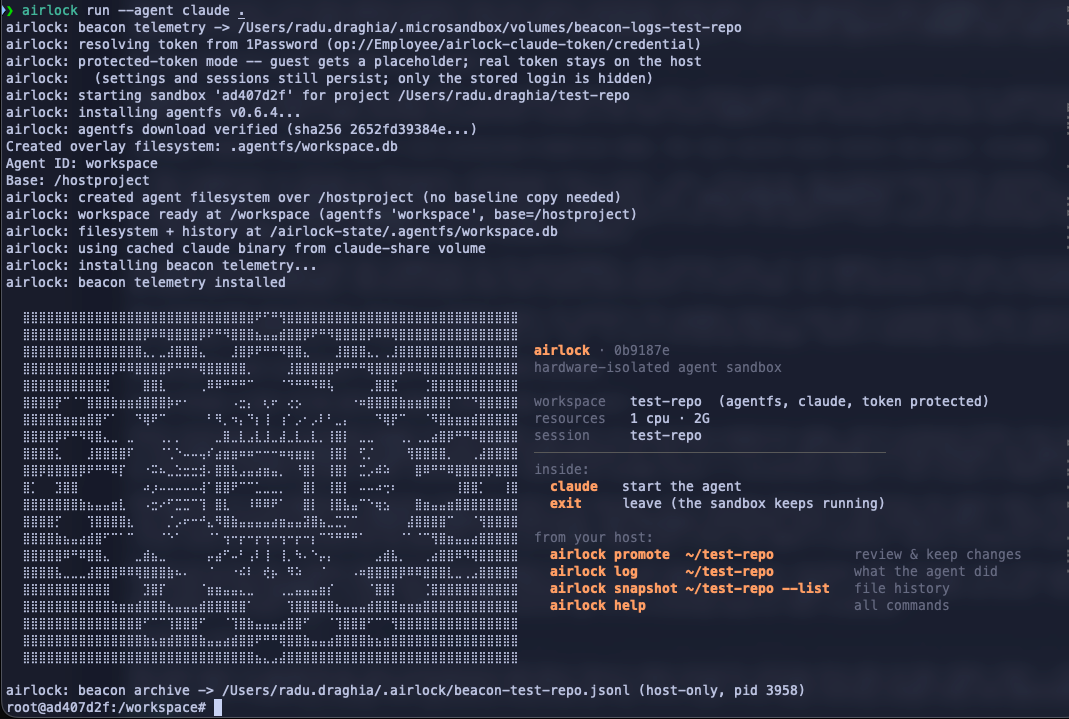
For Claude Code specifically there’s a second layer. By default the sandbox doesn’t even get a placeholder that resolves outside of Anthropic’s own API. If the agent tried to exfiltrate its own credential by, say, printing it to a file and asking you to cat it in a follow-up message, there’s nothing usable to exfiltrate.
Knowing what actually happened
Isolation answers “can the agent do damage.” I also wanted an honest answer to “what did the agent actually do,” not just a promise that nothing leaked.
airlock log turns a session into a searchable HTML timeline. Every prompt, every bash command, every file read and write, every bit of the agent’s own reasoning, lands in order. For Claude Code it reads directly from the agent’s own native session transcripts, no extra instrumentation required. Every sandbox also runs Agent Beacon as a second, independent layer. OpenCode has a plugin wiring it into every tool call. Claude Code doesn’t have an equivalent hook yet, so its Beacon log stays empty even though the binary is running. airlock log merges Beacon data in for OpenCode sessions on top of the same view. A host-side collector archives everything every couple of seconds, so the record survives even after the sandbox itself gets torn down. It’s the forensic record for “what did the agent actually touch,” separate from and in addition to whatever the filesystem isolation already prevented.
Tradeoffs I haven’t solved
A few things I want to be upfront about rather than gloss over.
TLS interception is a broad hammer. The moment you turn on protected-credential mode, all outbound HTTPS from the guest gets intercepted, not just the one call to the model provider. Git, npm, curl all keep working because the guest trusts the interception CA, but it’s still a real MITM sitting between the agent and the internet. If a tool inside the sandbox does certificate pinning, or otherwise refuses to work under interception, there’s an escape hatch (--no-protect-token). Using it means the real credential goes into the guest directly.
Promotion is a deliberate, separate step, by design. Nothing the agent does lands in your actual project until you run airlock promote. Committed work moves over as real git history via git bundle (hashes, authorship, and messages preserved) onto a new review branch, never onto the branch you’re standing on. Uncommitted changes get diffed and copied file by file, with an explicit dry-run by default. This is slower than “just trust the agent’s branch,” which is exactly the point.
Copy-on-write has a sharp edge worth knowing about. A file the agent has never touched reads through live from your real project. The instant the agent writes to it, that file forks permanently for the life of the sandbox. A host edit you make afterward becomes invisible to the agent, silently, with no error. This isn’t a bug so much as an inherent property of how the isolation works, and it’s the reason airlock has a sync command whose entire job is un-sticking exactly that situation.
Why there’s no public repo yet
airlock isn’t open source yet. Given the subject matter, I’d rather spend more time actually breaking it myself before I hand it to anyone else to try. Once it’s held up to enough of that, I’ll put it on GitHub.
What’s next
The next post covers what actually running this looks like day to day. The real commands, the workflow of catching what an agent did before it touches your project, and a couple of things that only show up once you run Claude Code and OpenCode side by side in the same setup.