The first post covered why airlock boots a real microVM per agent session instead of trusting a container or a policy. This one is about what it’s actually like to use, because “hardware-isolated sandbox” doesn’t mean much if the day-to-day workflow is unbearable.
It isn’t. But a handful of things only make sense once you’ve hit them.
Starting a session
airlock run ~/my-project
That’s the whole command. First run on a project installs the agent, sets up the AgentFS workspace, and drops you into a shell inside the sandbox at /workspace. From there, claude or opencode (--agent opencode picks the other one) works exactly like it would on your host, except every file write is landing in the guest’s own copy-on-write store.
Run it again on the same project and it re-attaches instantly instead of rebuilding. The sandbox keeps running in the background even after you exit the shell. Nothing is torn down, nothing is lost. Your work lives in a named state volume that survives stopping the VM entirely. Only airlock rm deletes it.
Want a second, fully separate sandbox for the same project? A different agent, a different credential, a spike you don’t want mixed in with your main session.
airlock run ~/my-project --session experiment-1
Sandboxes get a short name. Use your --session name if you give one, otherwise a random id. airlock ls shows a PROJECT column so you can always tell what a short name actually points at.
Getting work out of the sandbox
When you’re done, or just want to check in without leaving the shell, run this.
airlock promote ~/my-project
This is a dry run by default. It prints exactly what would move and touches nothing. If the agent committed inside the sandbox, those commits land as real git history (same hashes, same authorship, same messages) on a fresh review branch, never onto whatever branch you had checked out. If the agent left uncommitted changes, those show up as a plain file diff.
airlock promote ~/my-project --apply
That’s the version that actually does it. These are two separate, differently-named commands rather than a --dry-run flag you can forget. The destructive one requires typing an extra word every time.
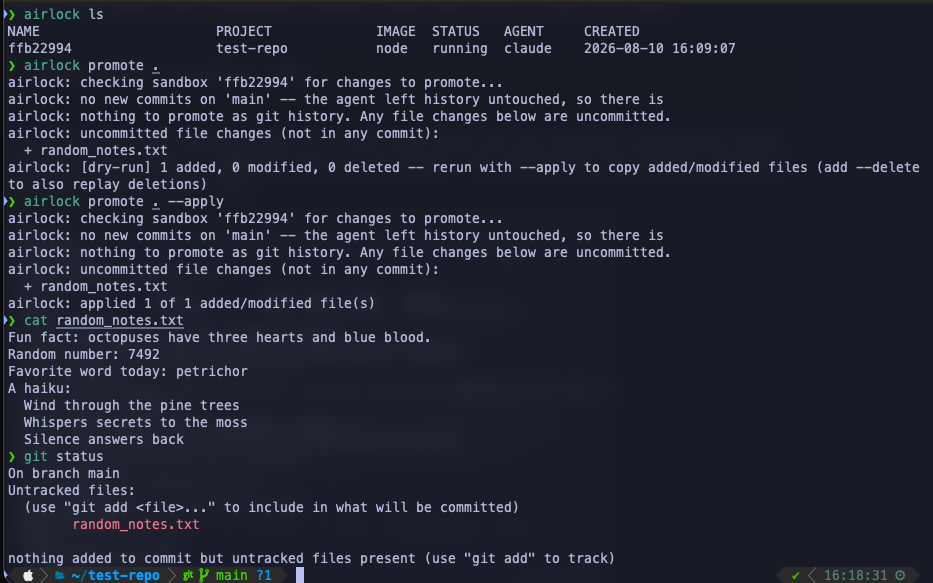
That’s the dry-run/apply pair on the same session as above. random_notes.txt never touched a commit, so it shows up as an uncommitted file change, gets applied with one command, and cat on the host confirms it’s the exact same file the agent wrote inside the sandbox.
A host edit can go stale inside the sandbox
The failure mode is silent by construction.
AgentFS reads through to your real project live, for any file the agent hasn’t touched yet. Create a new file on your host while a sandbox is running, and it shows up in /workspace. No sync needed, nothing special.
The moment the agent writes to a file, that file forks, permanently, for the life of that sandbox. Say you notice the agent got something wrong and it’s faster to fix it yourself than prompt again, so you edit that same file on your host. Your edit is now invisible to the agent, with no error and no warning. The agent’s copy stops reflecting reality, and nothing tells you it happened.
I hit this myself while testing. I had the agent append a line to a file, then appended a different line to the same file from the host, and confirmed with tail that the guest’s version still only showed the agent’s line. No indication anything had diverged.
airlock sync exists for this.
airlock sync ~/my-project --apply
It walks every file and compares host vs. workspace content. It re-forks only the ones that have diverged, which, by construction, is only ever files the agent has already touched. Untouched files were never a problem. Run it without --apply first and it tells you exactly what it found.
airlock: files with host edits not yet reflected in the workspace:
  ~ config.py
airlock: [dry-run] 1 file(s) would be re-forked from the host -- rerun with --apply
If you’re hand-editing a file mid-session that the agent has already worked on, run sync before telling the agent to continue. That’s my rule of thumb. If it’s a brand-new file, don’t bother. It was never stale.
Recovering an earlier version of a file
AgentFS keeps content history, not just current state, so you can snapshot the workspace and pull an old version back out later.
airlock snapshot ~/my-project                                    # take one, named by timestamp
airlock snapshot ~/my-project --list                              # see what you've got
airlock snapshot ~/my-project --show 20260809-142200 config.py    # print it
airlock snapshot ~/my-project --restore 20260809-142200 config.py # write it back into /workspace
This has saved me once already, after telling an agent to refactor something and deciding four prompts later that the original approach was fine.
Seeing what the agent actually did
airlock log ~/my-project
This builds a searchable HTML timeline of the whole session and opens it in your browser. Every prompt, every bash command, every file read and write, and the agent’s own reasoning in between, in order. I use this most often after a long agent run, before deciding whether to promote, to catch the one weird tangent buried in the middle of an otherwise reasonable session that I’d have missed just reading the final diff.
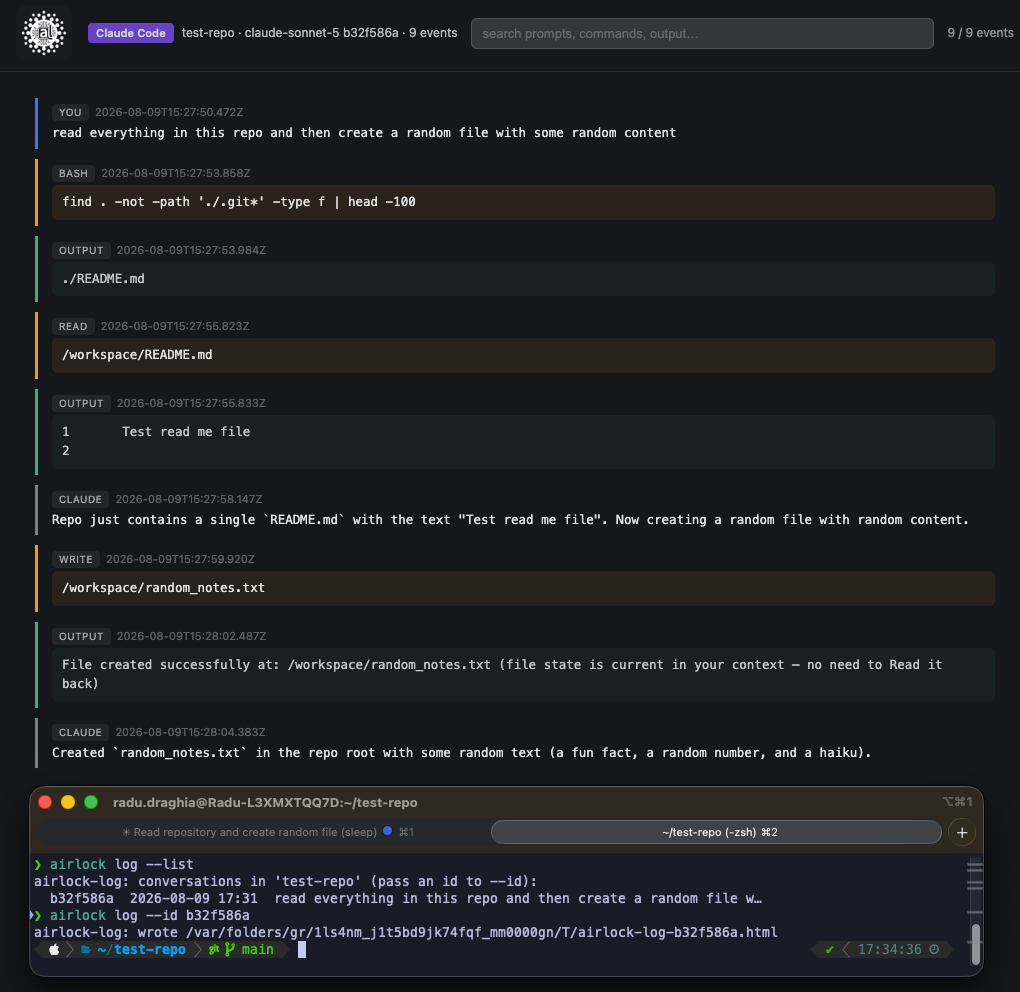
For Claude Code, this reads directly from its own native session transcripts. No extra plugin needed, which is what’s shown above. Agent Beacon runs inside every sandbox as a second, independent instrumentation layer. OpenCode has a plugin that feeds it events on every tool call. Claude Code doesn’t have an equivalent hook yet, so its Beacon log stays empty even though the binary is running. airlock log merges Beacon data in for OpenCode sessions where it’s available, on top of the same timeline view. Either way, the archive lives on the host and survives airlock stop, so you can review a session after the sandbox has sat idle for a while.
Running Claude Code and OpenCode side by side
--agent switches between the two, and the isolation guarantees are identical either way. The difference is entirely in credential plumbing. Claude Code authenticates with a single Anthropic token. OpenCode is multi-provider (GitHub Copilot, Anthropic, OpenAI, OpenRouter, etc.). Each provider you want available gets captured once and stored in 1Password.
airlock auth-capture opencode
This boots a disposable sandbox purely to run opencode auth login, splits whatever credential comes out into its own 1Password item, writes the reference to .env, and destroys the sandbox. Nothing is left behind on disk. Capture a second provider later and it adds to .env rather than replacing what’s there. Every provider you’ve captured stays available.
If you’re using OpenCode with more than one provider configured, having a credential present doesn’t mean OpenCode picks it as the active model automatically. You still open the model picker and choose, every fresh sandbox. That’s an OpenCode UX detail, not an airlock one, and expected behavior rather than a bug in credential handling.
GitHub Copilot’s model-picker gate looked like a bug in credential injection
With a GitHub Copilot credential configured, OpenCode’s UI kept re-prompting for a full login on every fresh sandbox, every time, regardless of whether the credential in .env was real or freshly captured. opencode auth list recognized it fine. A direct authenticated call to api.githubcopilot.com succeeded and returned a real model list.
The cause turned out to be entirely on GitHub’s side. OpenCode decides whether to show a provider as “connected” by calling that models endpoint and requiring at least one returned model to report model_picker_enabled: true. On the account I tested with, every single model in the response (real models, real capabilities, real usage data) had that flag set to false. No amount of re-authenticating, hardcoding a specific model string in config, or retrying fixed it, because the block was never “are you logged in.” It was “does your Copilot plan expose model-picker access at all,” a property of the GitHub account, not something a credential-injection layer downstream can do anything about.
I took a lesson from this. When a login prompt won’t go away no matter what you do to the credential, check what the actual “am I connected” call returns before assuming the plumbing is broken. Sometimes the plumbing is fine and the account just isn’t entitled to what you’re asking for.
Cleaning up
airlock stop <name>          # stop the VM, keep everything (work, credentials)
airlock rm <name>            # stop + delete everything -- workspace, login state, telemetry
rm sweeps every volume tied to that sandbox’s session key, not just whatever happens to be mounted at the moment. That includes credential volumes for an agent you’re not currently running, if you’ve ever switched agents under the same session. That one took a real bug report to get right. Earlier versions left orphaned credential volumes behind indefinitely if you captured a second agent’s login under a session that already had a first one.
That’s the day-to-day loop. run, work, promote when you mean it, sync if you’ve hand-edited something the agent already forked, snapshot before anything risky, rm when you’re actually done. The isolation from the first post is what makes all of this safe to do without thinking twice about it.